Utilization of BOSS (Business Operation Support System, BOSai System), a disaster response process management system
BOSS Operation Manual
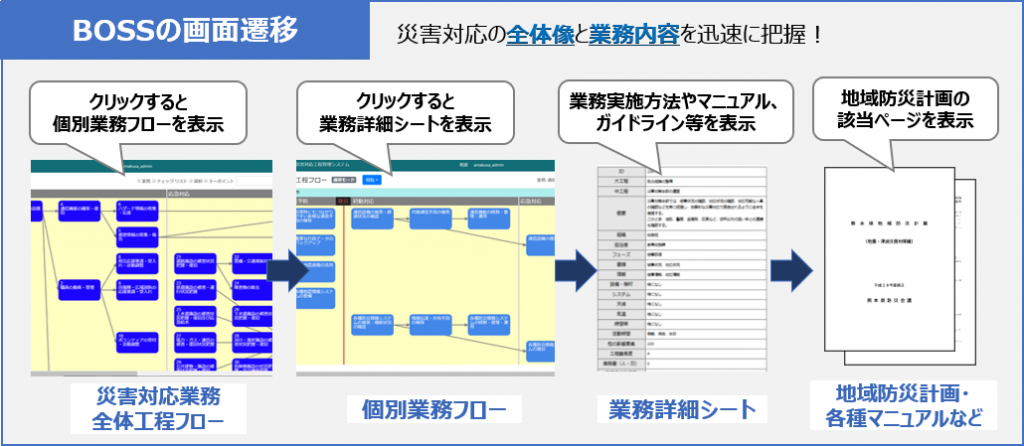
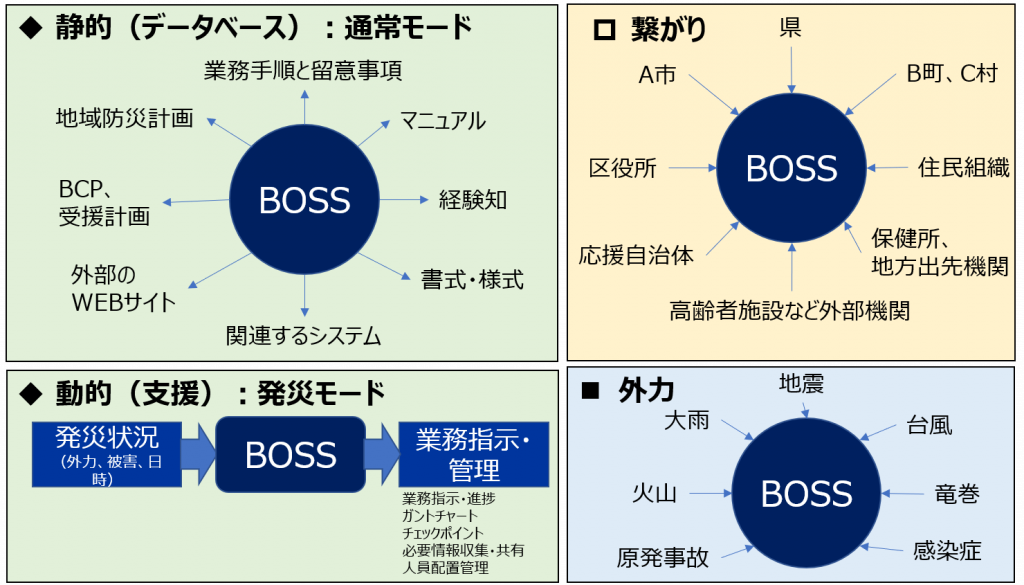
BOSS connects data and people
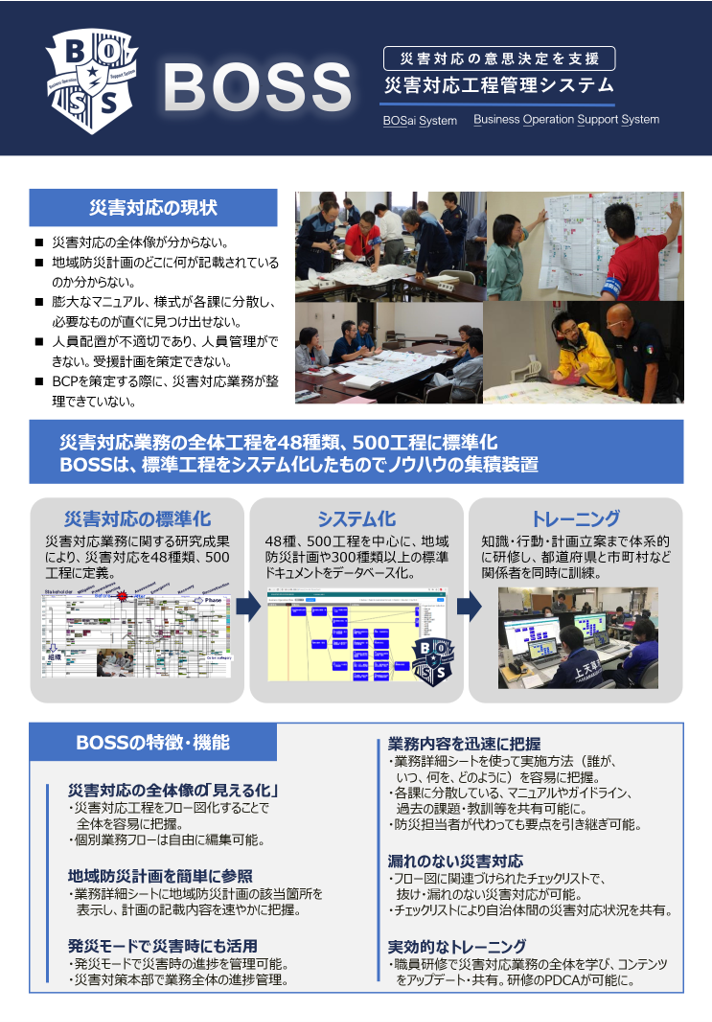
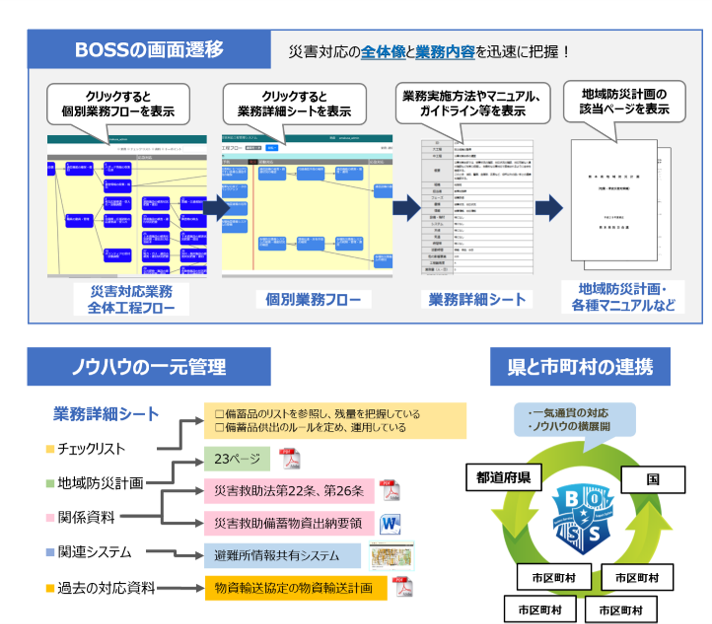
Current Status of Disaster Response
- I don't understand the whole picture of disaster response.
- I don't know where to find what is described in the regional disaster management plan.
- A huge number of manuals and forms are dispersed in each section, and it is difficult to find what you need immediately.
- Inadequate staffing and lack of personnel management.
- Unable to formulate a plan for receiving assistance.
- Disaster response operations are not organized when developing a BCP.
BOSS Features and Functions
Visualization" of the overall disaster response
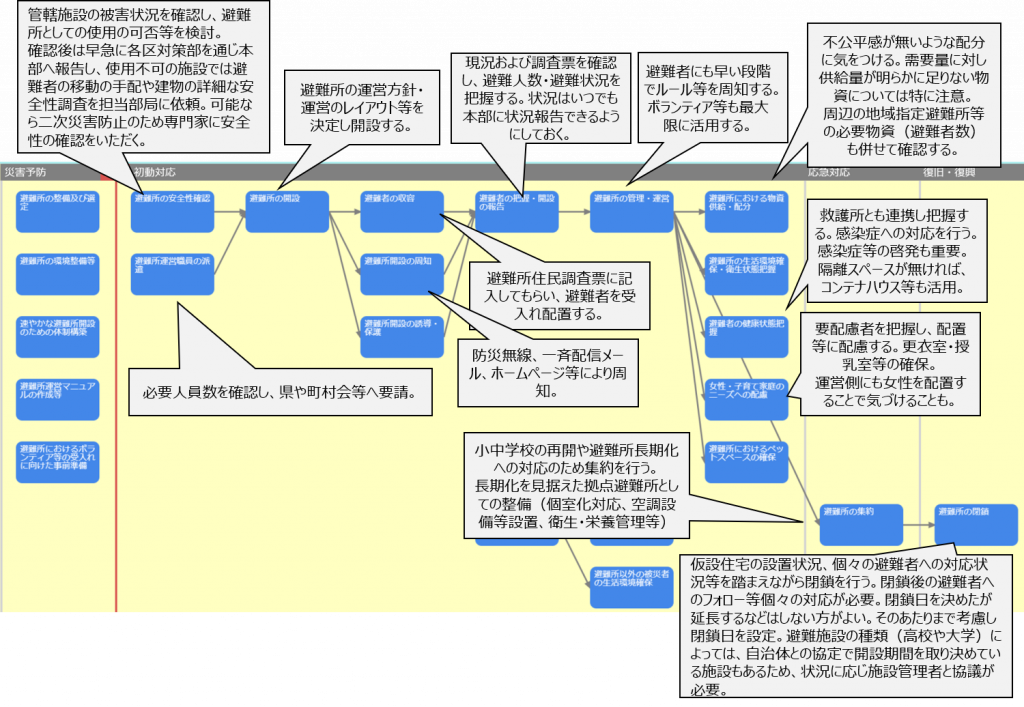
Flow diagram of disaster response process for easy understanding of the entire process.
Individual workflows can be freely edited.
Easy reference to local disaster management plans
The relevant sections of the regional disaster prevention plan are displayed on the detailed operations sheet, and the contents of the plan are quickly grasped.
Disaster mode for use in times of disaster
Disaster progress can be managed in onset mode.
The Disaster Response Headquarters manages the progress of the entire operation.
Quickly understand your business operations
The detailed work sheet makes it easy to grasp the implementation method (who, when, what, and how).
Manuals, guidelines, past issues, lessons learned, etc., which are dispersed throughout each section, can now be shared.
The main points can be taken over even if the person in charge of disaster prevention is replaced.
Disaster response without omissions
Checklists associated with flow diagrams allow for a complete disaster response without omissions or omissions.
Checklists are used to share the status of disaster response among municipalities.
Effective Training
The entire disaster response operations are learned, content is updated, and shared through staff training. PDCA (Plan-Do-Check-Act) cycle of training is now possible.
BOSSの操作説明動画
以下では、災害対応工程管理システムBOSS(Business Operation Support System)の研修項目を紹介します。BOSSの概要、基本操作、編集方法、災害時の活用方法、県管理者向けの操作方法について、動画教材とあわせて段階的に学ぶことができます。
① BOSSの概要について
1. BOSSの開発に関する背景・BOSSの概要、全体像
BOSSの開発に関する背景や、BOSSの概要、全体像について説明します。また、業務フロー、中工程フロー、詳細シートにどのような内容が整理されているかを確認します。
- BOSS開発に関する背景
- BOSSの概要
- 業務フロー・中工程フロー・詳細シートの構成
- 各シートに整理されている内容の説明
② BOSSの基本操作について
1. ログイン方法
BOSSへのログイン方法から、災害種別の選択、業務フロー画面の表示までの基本操作を確認します。
- ログイン画面の操作
- 災害種別の選択
- 業務フロー画面までの操作手順
2. 基本的な閲覧方法
BOSS内の各画面の見方や、部署選択などの基本的な閲覧操作について説明します。
- 各画面の遷移方法
- 部署選択操作
- 基本的な閲覧方法
③ BOSSの編集方法について
1. 中工程フロー図の編集方法
中工程フロー図を編集する際の基本操作について説明します。
- 中工程フロー図の基本的な編集方法
- コネクタの編集
- 枠・行・色の編集
2. 詳細シートの編集方法
詳細シートの基本的な編集方法や、関連資料・URLの登録方法について説明します。
- 詳細シートの基本的な編集方法
- ファイル登録
- URL登録
3. BOSSの修正・更新に関するルール・登録時のポイント
BOSSを修正・更新する際のルールや、登録時に注意すべきポイントについて説明します。
- 中工程フロー図の修正・更新ルール
- 詳細シートの修正・更新ルール
- BOSS登録におけるポイント
④ 災害時のBOSSの使い方について
1. 基本的な災害モードの閲覧方法
災害時に使用する災害モードの基本的な確認方法について説明します。
- 災害モードの基本的な確認方法
- 災害時の画面閲覧方法
2. 災害対応の進捗状況の登録方法
災害対応の進捗状況をBOSS上で登録する方法について説明します。
- 対応状況の入力
- チェックリスト機能を用いた入力
- ツイート機能を用いた入力
3. BOSSを用いた訓練イメージ
BOSSを活用した訓練の進め方や、実施時のイメージについて説明します。
- BOSSを用いた訓練を実施する際の手続き
- BOSSを用いた訓練の進め方
- 訓練時の活用イメージ
⑤ 県管理者の行うBOSSの操作について
1. 災害の登録と災害モードへの移行
県管理者として行う、新規災害の登録方法や、通常モードから災害モードへの切り替え方法について説明します。
- 新規災害の登録方法
- 通常モードから災害モードへの切り替え
- 災害モードから通常モードへの切り替え
2. 組織改編等に伴う部署(マスターデータ)の修正
組織改編などに伴う担当部署の追加や名称変更など、マスターデータの修正方法について説明します。
- 担当部署の追加
- 担当部署の名称変更
- 組織改編への対応方法
- 部署統合を想定した修正方法
3. CSVのエクスポート・インポート
CSVデータのエクスポート・インポート機能を用いたデータ管理方法について説明します。
- CSVエクスポート・インポートでできること
- データのエクスポート方法
- エクセルによる修正方法
- 修正データのインポート方法
※上記、Youtubeの説明動画は、和歌山県災害対応工程管理システムの構築業務の中で作成しました。